
E verything digital was the demand, from their old style paper application forms to completely cutting their daily phone calls asking the following "Hello..do you have internet in my area?". We had to set up a full list with all their available internet packages, speeds and features. Then for every packages there had to be a specific application form which includes their basic info, packages selected, bank debit order forms and secure digital signatures. These forms then had to be converted and all the user inputs needs to be displayed in the exact area of their existing paper forms.
This was quite a challenge as we needed to tell the website exactly where each line on a physical page needs to go. Then each for needed to go to Letaba wireless and to the client itself. We made sure that the forms worked 100% on desktops and mobile devices.
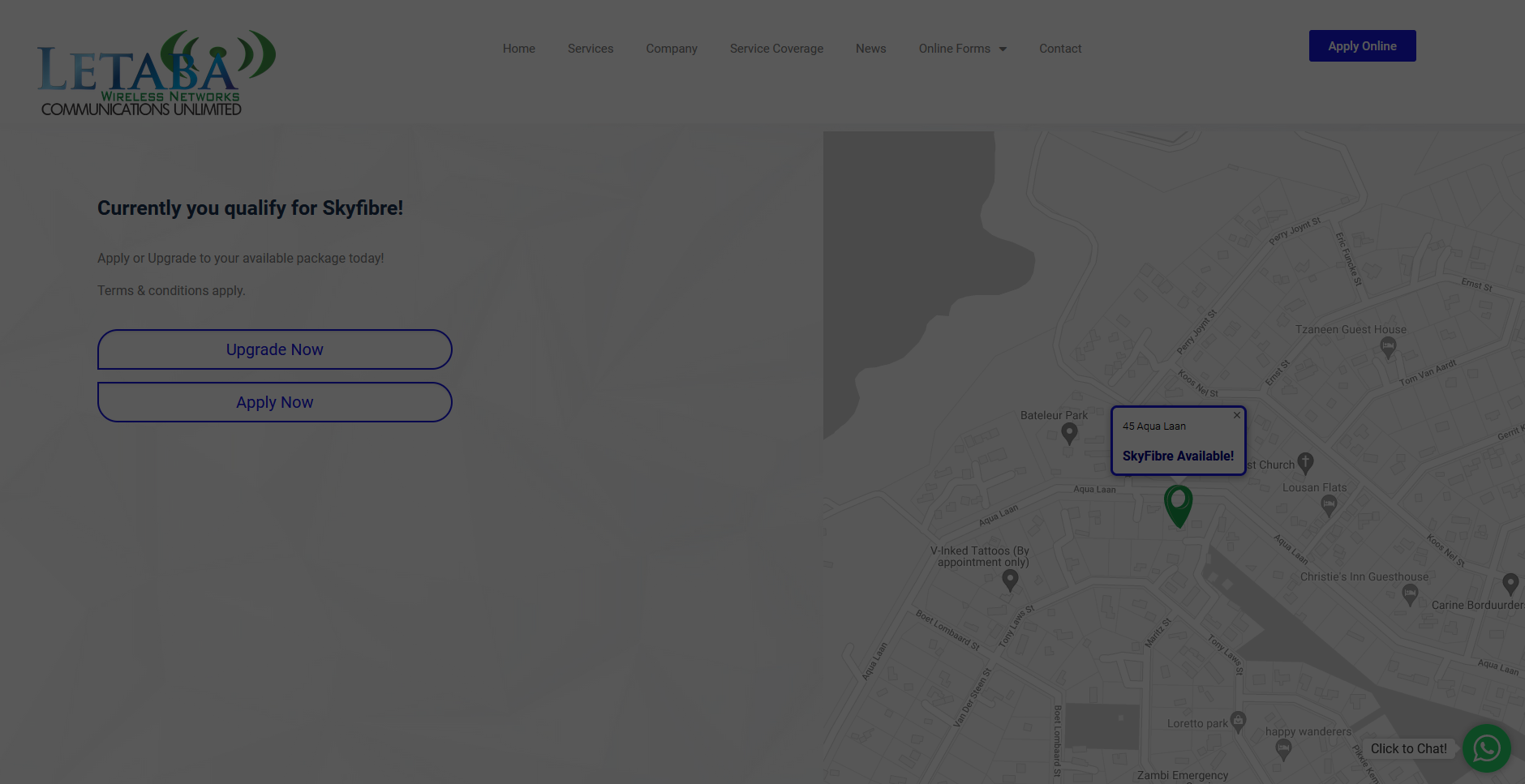
All available and existing coverage locations needed to be hosted on a google server and pointed to their site. So when a client types in their address, the site needs to respond with an accurate answer.
function wpb_hook_javascript() {
	if( is_page('servicecoverage' + 'online-account-application' + 'add-on-reactivate-application' + 'takeover-form-existing-client' + 'upgrade-downgrade-form') ) {
		?>
			<script>
				async function clicked(btntext){

					event.preventDefault();

					var requestAddress = {
						method: 'GET',
						redirect: 'follow'
					};

					var Longitude;
					var Latitude;

					try {

						let addr_response = await fetch("URL=" + btntext, requestAddress);
						let myJson = await addr_response.json();

						Longitude = myJson.longitude;
						Latitude = myJson.latitude;

						var requestCoverage = {
							method: 'GET',
							redirect: 'follow'
						};

						try {

							let cvrg_response = await fetch("URL/coords?longitude=" + Longitude + "&latitude=" + Latitude, requestCoverage);
							let coverage = await cvrg_response.text();

							var strSplit = btntext.split(',');
							var streetName = strSplit[0];

							window.location = "https://www.letaba.net/new/coverage-results/?coverage=" + coverage + "&longitude=" + Longitude + "&latitude=" + Latitude + "&address=" + streetName;
						} catch (cvrg_error) {

							alert("cvrg_error: " + cvrg_error);
						}
					} catch (addr_error) {

						alert("addr_error: " + addr_error);
					}
				}
			</script>
		<?php
	}
}
add_action('wp_head', 'wpb_hook_javascript');


function add_my_scripts(){
    if( is_page('coverage-results') ) {
        ?>
			<script
				src="https://maps.googleapis.com/maps/api/js?key=APIKEY=initMap&libraries=&v=weekly"
				defer
			></script>
			<style type="text/css">
				/* Set the size of the div element that contains the map */
				#map {
					height: 980px;
					/* The height is 900 pixels */
					width: 100%;
					/* The width is the width of the web page */
					/*position: absolute;*/
					padding: 0px;
					border-width: 0px;
					margin: 0px; left: 0px; top: 0px;
					/*touch-action: pan-x pan-y;*/


			</style>
			<script>
				function initMap() {

					var url_string = window.location.href;
					var url = new URL(url_string);
					var Coverage = url.searchParams.get("coverage");
					var Longitude = parseFloat(url.searchParams.get("longitude"));
					var Address = url.searchParams.get("address");
					var Latitude = parseFloat(url.searchParams.get("latitude"));

					var theMessage;
					var infoMessage;
					var theSolution;

					/*alert("lng=" + Longitude + "lat=" + Latitude);*/

					if(Coverage == "TruFibre"){
						theMessage = "<span>You qualify for</br>Trufibre!</span>";
						infoMessage = "<span></br></br>TruFibre Available!</span>";
					}


					if(Coverage == "SkyFibre"){
						theMessage = "<span>Currently you qualify for Skyfibre!</span>";

						infoMessage = "<span></br></br>SkyFibre Available!</span>";
					}


					if(Coverage == "Wireless"){
						theMessage = "<span>Currently you qualify for Wireless!</span>";

					infoMessage = "<span></br></br>Wireless Available!</span>";
					}


					if(Coverage == "None"){
						theMessage = "<span>Oh No!</br>Unfortunately we do not </br>cover your area yet!</span>";
					infoMessage = "<span></br></br>No Service Available!</span>";
					}


					/*alert(theMessage);*/


					var theplace = { lat: Latitude, lng: Longitude };

					var styles = [{
						"stylers": [{
							"saturation": -100
						}]
					}];

					const infowindow = new google.maps.InfoWindow({

						content: Address + '\n' + infoMessage,

					})


					var map = new google.maps.Map(document.getElementById("map"), {
						zoom: 17,
						center: theplace,
						disableDefaultUI: true,
						styles: styles,
					});
					var image = 'URL';
					var marker = new google.maps.Marker({
						position: theplace,
						map: map,
						icon: image

					});


					infowindow.open(map, marker);

					var insertText = document.getElementById('textresult');

					insertText.innerHTML = theMessage;


				}
			</script>
Lastly, we had to link a application form the the result given by die google map api server.
if(Coverage == "TruFibre") newURL = "URL";
Everything need to work together
The selected packages, forms en google locations needed to work perfectly in order to point the client to correct application form. Thie form then gets send to Letaba Wireless Internet where they then process the application and get the installation sorted
- Working digital forms.
- Correct location results.
- Re-direction to correct output form.
- Letaba Wireless Internet receives the correct form.